AI Doubt Solver: eSaral Doubt Solving Tool for Class 8 to 12, JEE and NEET Students
Table of Contents

Looking for an AI doubt solver for Class 8 to 12, JEE or NEET? eSaral’s Doubt Solving Tool (DOST) is the doubt solver inside the eSaral app, for Foundation students (Class 8, 9 and 10), Class 11 and 12 students, and JEE and NEET aspirants. You pick the subject and the chapter, write your doubt, add a photo of the question if you want, and submit. An eSaral faculty member solves it, and every doubt is solved within 24 hours. You can ask as many doubts as you need, in any subject, at any time of the day. The tool is for students who are enrolled with eSaral and have mentorship, from Class 8 to dropper students, in both Hindi and English medium.
eSaral Doubt Solving Tool at a Glance
| Point | Details |
|---|---|
| Name | Doubt Solving Tool (DOST) in the eSaral app |
| Who can use it | Students enrolled with eSaral who have mentorship, from anywhere in India |
| Classes | Foundation (Class 8, 9 and 10), Class 11 and 12, and dropper students |
| Exams | JEE and NEET, along with the school subjects of Class 8 to 12 |
| Medium | Hindi and English medium, both covered |
| Subjects | Any subject: Physics, Chemistry, Biology, Mathematics and English (Grammar and Writing sections) |
| Who solves the doubt | An eSaral faculty member |
| Response time | Every doubt is solved within 24 hours |
| Number of doubts | No limit: ask multiple questions |
| When you can ask | 24/7 |
| Follow-up | The doubt stays open until it is clear, and then it is closed |
| Add a photo | Yes, with the Upload Image button |
| Cost | Not free |
Why Students Look for an AI Doubt Solver
Students search for an AI doubt solver because doubts do not come at a fixed time. A numerical gets stuck at 11 at night, a reaction does not make sense on a Sunday, or a diagram is not clear before a test. Students want an answer without waiting for the next class. The benefit of any AI doubt solver is that it is there when you need it. The risk is accuracy: in JEE and NEET, one wrong step in Physics or Maths can change the answer. That is why, when students search for an AI doubt solver, eSaral’s tool gives them a faculty answer: every doubt is sent to a faculty member.
How to Use eSaral’s Doubt Solver, Step by Step
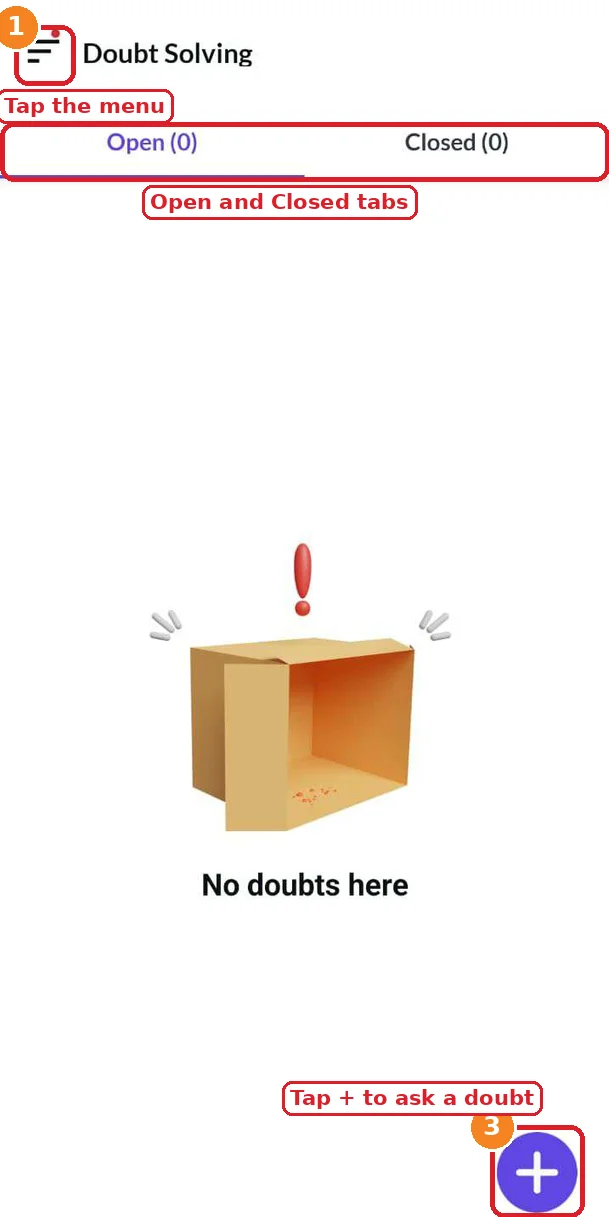
Students who look for an AI doubt solver can follow these steps in the app. The marked screenshots below show where to tap, and the numbers on the pictures match the steps.
- Open the eSaral app, and tap the menu icon at the top left.
- Tap Doubt Solving Tool (DOST) in the menu.
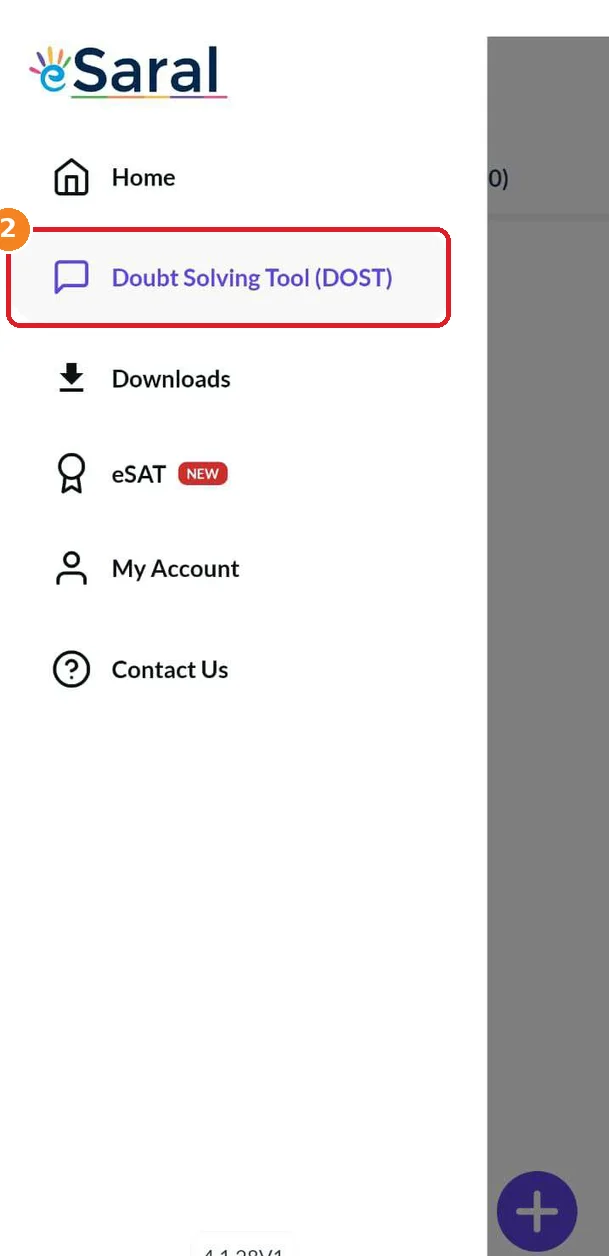
3. Tap the + button to ask a new doubt. The page has two tabs, Open and Closed.
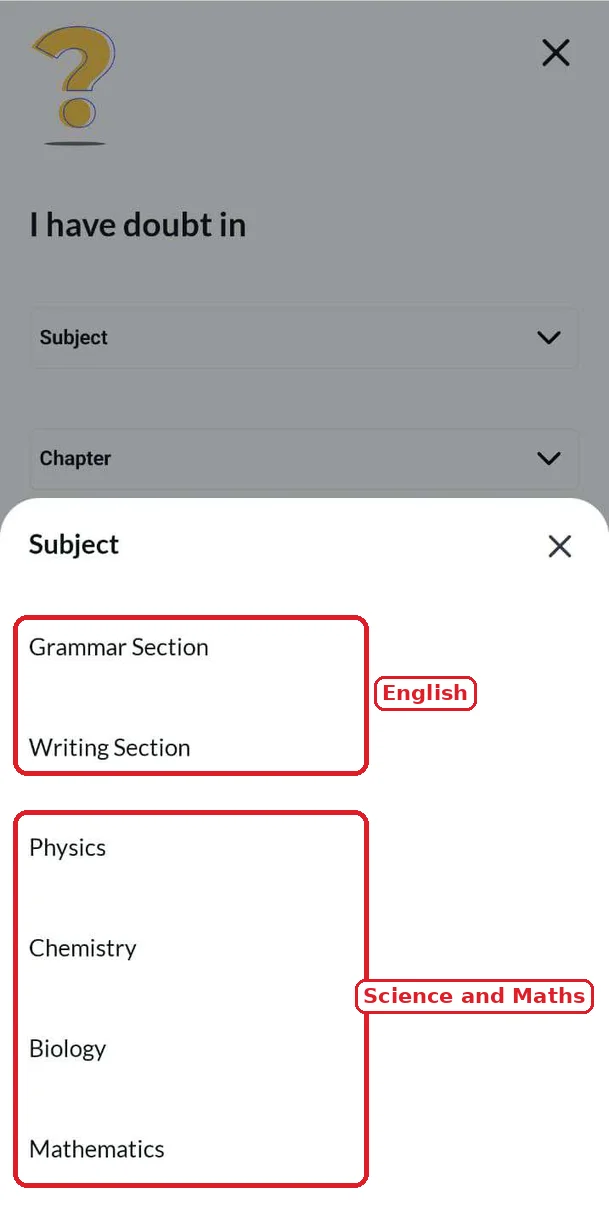
- Choose the subject, for example Physics.
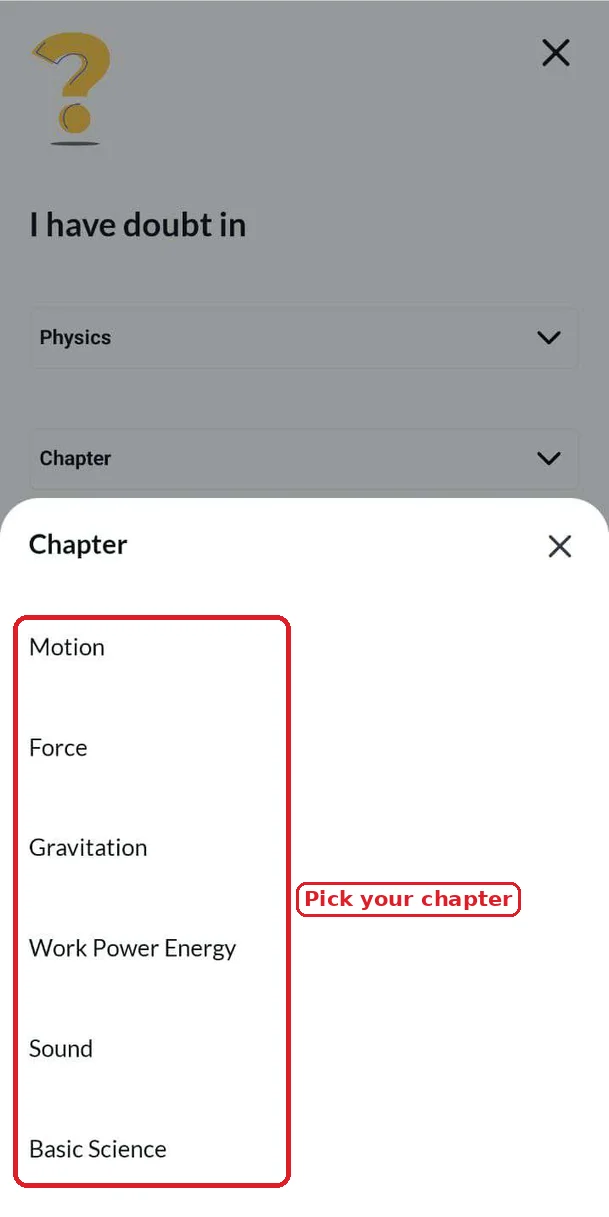
- Choose the chapter, for example Force.
- Describe your doubt in detail in the Doubt box.
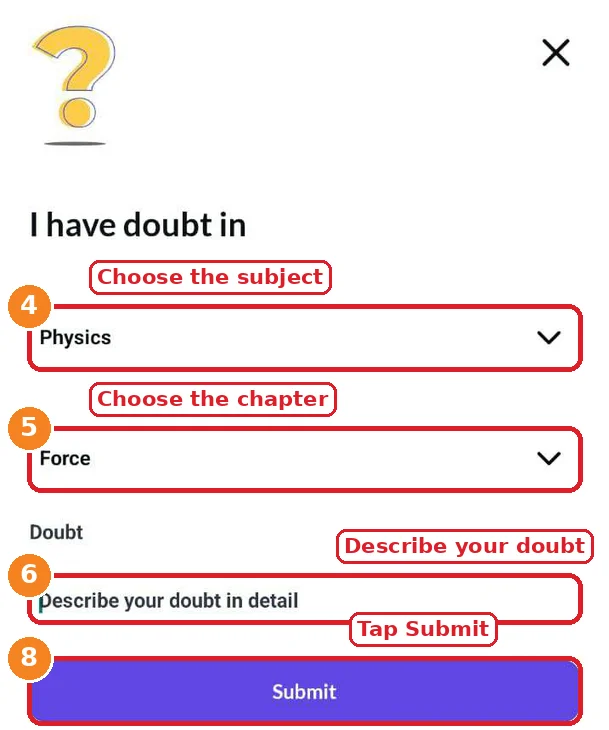
7. Add a photo with Upload Image if the question has a figure, a graph or your working.
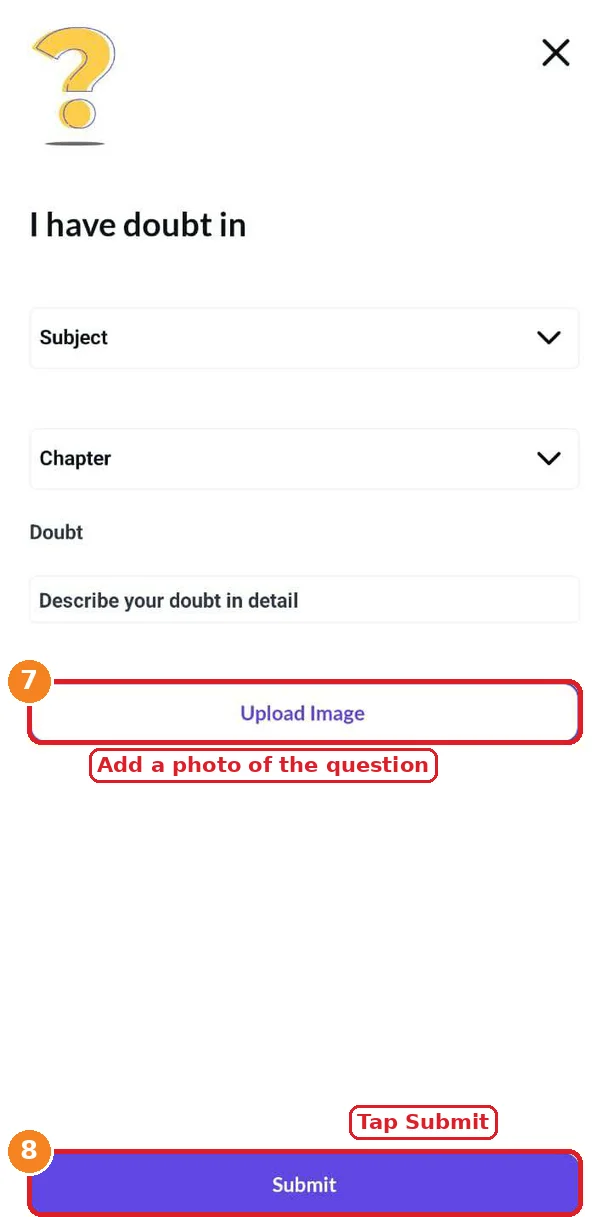
8. Tap Submit. The doubt moves to the Open tab and is assigned to a faculty member, who solves it within 24 hours.
Subjects and Chapters: Ask a Doubt in Any Subject
A good AI doubt solver should cover every subject you study, and eSaral’s tool lets you ask a doubt in any subject. The subject list includes Physics, Chemistry, Biology and Mathematics, and the Grammar Section and the Writing Section of English. After you choose the subject, you choose the chapter, so that the faculty member knows the topic of your doubt.
For school students, the Physics chapters include Motion, Force, Gravitation, Work Power Energy and Sound. The chapters you see depend on your class and your course.
Open and Closed Doubts: Track Every Doubt
The Doubt Solving page has two tabs:
- Open: every doubt that is not yet clear stays here. If you do not understand the answer, the doubt remains open until it is cleared.
- Closed: when a doubt is solved, it is closed and moves here. You can go back to it for revision before a test.
In eSaral’s doubt solver, a doubt does not get one answer and then disappear: it stays open until it is clear. A simple habit is to read your Closed doubts once a week. They show the exact points where you got stuck, and they make a personal revision list for the chapter.
Who Can Use eSaral’s Doubt Solver?
Unlike a free AI doubt solver app, the Doubt Solving Tool is for students who are enrolled with eSaral and have mentorship, from anywhere in India.
| Student | How the doubt solver helps |
|---|---|
| Foundation (Class 8, 9 and 10) | School-level doubts in Physics, Chemistry, Biology, Maths and English grammar and writing, chapter by chapter |
| Class 11 and 12 | Doubts from long chapters of Physics, Chemistry, Maths and Biology, for school exams and for the base of JEE and NEET |
| JEE aspirants | Doubts from problem solving in Physics, Chemistry and Maths |
| NEET aspirants | Doubts from concepts and numericals in Physics, Chemistry and Biology |
| Dropper students | Doubts at any time of the day, with no limit on the number of questions |
| Hindi and English medium students | Available for both JEE and NEET, in both mediums |
You can see the programmes on the Foundation (Class 8, 9, 10), JEE and NEET pages. The JEE and NEET programmes also cover Class 11 and 12.
How to Write a Doubt That Gets a Clear Answer
Whether you use an AI doubt solver or eSaral’s tool, a clear doubt gets a clear answer.
- Choose the right subject and chapter. It tells the faculty member where to look.
- Write the full question, or add a clear photo of it.
- Say what you tried, and where you got stuck. A doubt like “I used $F = ma$ but the answer does not match” is easier to answer than “solve this”.
- Ask one doubt at a time. If you have 3 doubts, submit 3 separate doubts. There is no limit, so you do not have to hold back.
- Say what you did not understand in the answer, if the doubt stays open.
What Makes eSaral’s Doubt Solver Different
Students who search for an AI doubt solver want a correct answer at any hour. eSaral’s Doubt Solving Tool gives that through eSaral faculty, so you get a teacher’s explanation for your doubt.
| What you get | How it works in eSaral’s doubt solver |
|---|---|
| Answer from faculty | Every doubt is assigned to an eSaral faculty member |
| Right context | You choose the subject and the chapter, and you can add a photo |
| Solved in time | Every doubt is solved within 24 hours |
| Clear until the end | The doubt stays open until it is clear |
| No limit | Ask as many doubts as you need, 24/7 |
| Languages | Hindi and English medium |
An AI doubt solver is a quick way to ask a doubt, and eSaral’s tool gives you the same convenience with a faculty answer.
AI Doubt Solver for Class 8 to 12
Doubts start early and continue through school, so an AI doubt solver for Class 8 to 12 has to cover every chapter and every subject. eSaral’s Doubt Solving Tool does this for Class 8, 9, 10, 11 and 12, chapter by chapter.
- Class 8, 9 and 10: students get stuck in Motion, Force, Gravitation, Work Power Energy and Sound in Physics, in reactions and equations in Chemistry, in diagrams in Biology, in Maths steps, and in English grammar and writing.
- Class 11 and 12: an AI doubt solver for Class 11 and 12 has to handle longer chapters and harder numericals. Doubts come in Physics, Chemistry, Maths and Biology, and they matter both for school exams and for the base of JEE and NEET.
For the chapter answers of your textbook, see eSaral’s NCERT Solutions for Class 10 and NCERT Solutions for Class 11.
AI Doubt Solver for JEE and NEET
JEE and NEET students who look for an AI doubt solver usually need help in the middle of problem solving, when a concept from one chapter meets another. You can submit the question, your working and the point where you stopped, and get a faculty answer in the app, in Hindi or English medium. For NEET, you can also add a photo of a diagram. Dropper students can use it in the same way, with no limit on questions.
An AI doubt solver is one part of preparing with AI. eSaral also has a guide for each exam on how to use AI for the whole preparation: an AI tutor, notes, a study planner, MCQs, and the AI analysis of eSaral’s AI test series.
- AI for JEE: how to use AI for JEE Main and JEE Advanced, with eSaral’s AI test series, chapter-wise tests, notes and previous year questions.
- AI for NEET: how to use AI for NEET UG, including Biology notes and diagrams, with eSaral’s AI test series, chapter-wise tests, notes and previous year questions.
Use the Doubt Solver After a Test
A test shows you what you do not know, and a doubt solver clears it. Any AI doubt solver is more useful after a test, when you know exactly what you got wrong. eSaral’s AI test series gives an AI-powered analysis after every test: according to eSaral, it flags weak topics, compares you with other students across India, and recommends what to revise. After you read the report, mark the wrong and the guessed questions, group them by subject and chapter, and submit each one as a doubt with a photo of the question. Read the answers, keep the doubts open until they are clear, and revise the Closed doubts before the next test. You can see all the tests on the eSaral Test Series page, and the app also has the eSAT section, marked new in the menu.
Study Material to Use Before You Ask a Doubt
Before you open any AI doubt solver or submit a doubt in the app, read the chapter once. For school students, eSaral’s NCERT Solutions for Class 9 Science, NCERT Solutions for Class 10 and NCERT Solutions for Class 11 can help you to revise the concept. JEE and NEET students can find notes, previous year questions and the AI test series on the AI for JEE and AI for NEET pages. If the doubt is still there, ask it in the app.
Is eSaral’s Doubt Solving Tool Free?
Many AI doubt solver apps have a free plan, but eSaral’s Doubt Solving Tool is not free. It is available to students who are enrolled with eSaral and have mentorship. To know how to get access, check the eSaral app or contact the eSaral team.
How to Get Started
If you want an AI doubt solver that gives you a faculty answer, download the eSaral app from Google Play or the App Store. Open the menu, tap Doubt Solving Tool (DOST), and tap the + button to ask your first doubt. The menu of the app also has Home, Downloads, eSAT, My Account and Contact Us.
Frequently Asked Questions
Find answers to common questions.
What is an AI doubt solver, and how does eSaral’s Doubt Solving Tool work?
An AI doubt solver is a tool that students use to get a quick answer to a doubt. eSaral’s Doubt Solving Tool (DOST) is a doubt solver inside the eSaral app: you choose the subject and the chapter, write your doubt, add a photo if you want, and submit. An eSaral faculty member solves it, and the answer reaches you within 24 hours.
Who solves the doubts in eSaral’s doubt solver?
The doubts are solved by eSaral faculty. Every doubt that you submit is assigned to a faculty member, so you get a teacher’s explanation for your question.
Which is the best AI doubt solver for JEE and NEET students?
The best doubt solver is the one that gives a correct answer in steps that you can follow. For JEE and NEET, where one wrong step changes the answer, eSaral’s Doubt Solving Tool gives faculty-solved answers in Physics, Chemistry, Maths and Biology, in Hindi and English medium.
Who can use eSaral’s doubt solver?
Students who are enrolled with eSaral and have mentorship can use it, from anywhere in India. If you are an enrolled student, open the eSaral app and find Doubt Solving Tool (DOST) in the menu.
Which classes does the doubt solver cover?
It covers Class 8, 9, 10, 11 and 12, and dropper students. This includes the school-level doubts of every class, and the doubts of JEE and NEET preparation.
Is the doubt solver available in Hindi and English medium?
Yes. It is available in Hindi medium and in English medium.
How long does it take to get a doubt solved?
Every doubt is solved within 24 hours. A doubt that you submit in the evening or at night is also answered within those 24 hours.
Is there a limit on the number of doubts I can ask?
No. You can ask multiple questions, and there is no limit on asking. Submit one doubt at a time, with the right subject and chapter.
Which subjects can I ask doubts in?
You can ask a doubt in any subject. The subject list includes Physics, Chemistry, Biology and Mathematics, and the Grammar and Writing sections of English. After you pick the subject, you choose the chapter.
Can I ask a doubt at night or on a holiday?
Yes. Doubts can come at any time, so you can submit a doubt 24/7. The 24-hour response time starts from the moment you submit it.
What happens if I do not understand the answer?
The doubt stays in the Open tab until it is clear. When the doubt is solved, it is closed and moves to the Closed tab, where you can read it again.
Is eSaral’s doubt solving tool free?
No. The Doubt Solving Tool is not free. It is available to students who are enrolled with eSaral and have mentorship.
Can I use the doubt solver with the test series?
Yes. After you solve a test of an eSaral test series, such as the AI test series for JEE and NEET, read the AI report to find your weak topics, list the questions you got wrong, and submit each one as a doubt under the right subject and chapter. Then attempt the next test with those concepts clear.